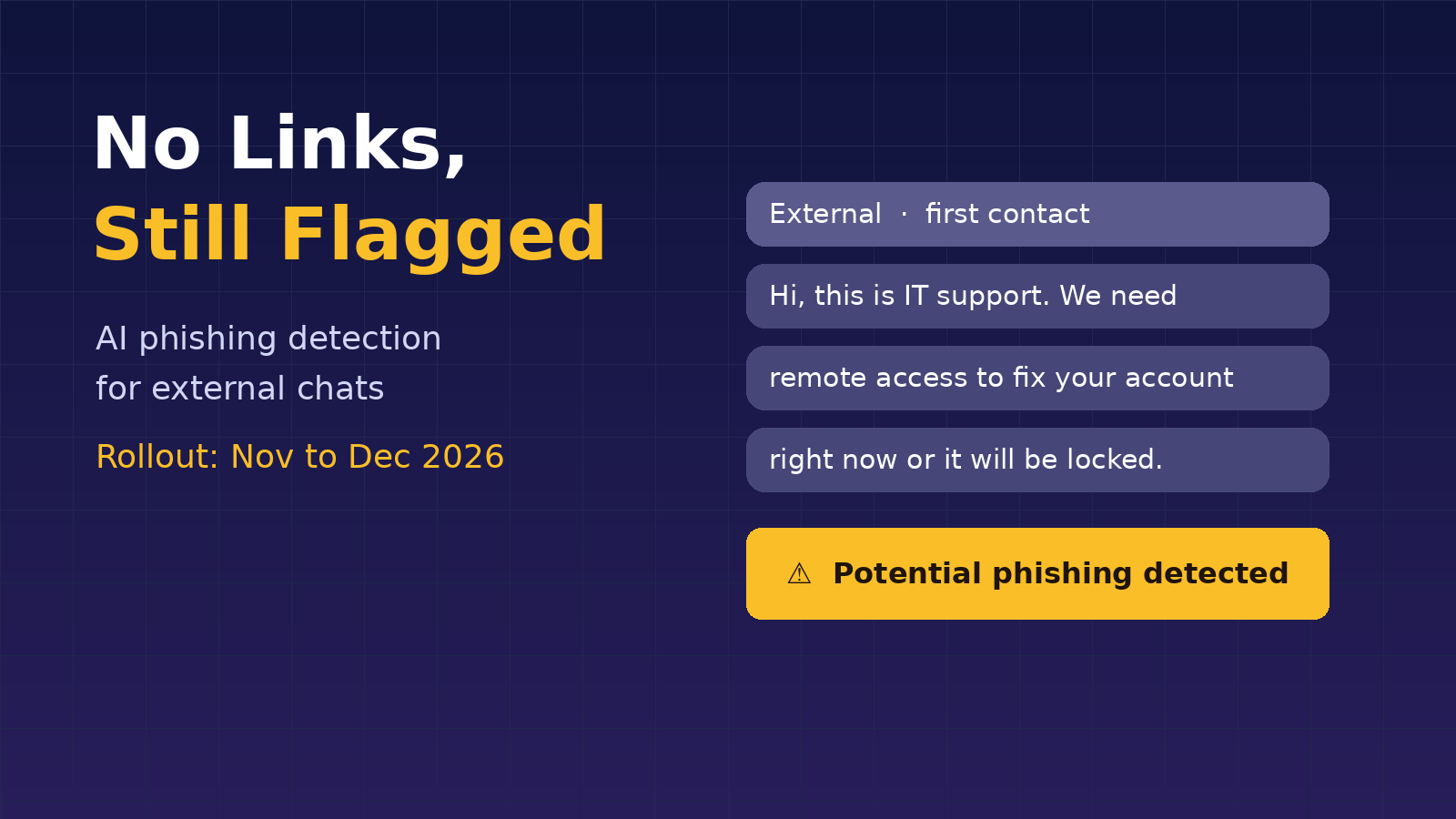
Microsoft is bringing AI-powered, context-aware phishing detection to Microsoft Teams, and it is aimed squarely at the attacks that sail past traditional filters: social engineering chats that carry no malicious link, no file and no payload, just a convincing story. Announced in Microsoft 365 Message Center post MC1519866 on October 21, 2026, the feature analyzes the context of external first-contact chats to spot phishing, impersonation and deceptive intent. Targeted Release starts in early November, worldwide general availability follows in early to mid-December, and it switches on with no admin configuration at all. Here’s what it does, what users will see, and what IT teams should do before it lands.
The Announcement: Phishing Detection That Reads Intent
Teams has long been able to scan URLs and attachments, but the fake help desk caller who simply asks for a remote session leaves nothing to scan. Microsoft says the new capability “analyzes conversation context to identify suspicious behavior that may not include traditional indicators such as malicious links or files.” It targets phishing, social engineering, impersonation attempts and deceptive intent.
For most tenants, detection focuses on external first-contact chats, meaning one-on-one and group conversations started by a new external person the user has never messaged before. Microsoft’s support documentation notes that Teams mobile users in China may also get additional fraud protection for in-tenant conversations to address region-specific fraud patterns.
Rollout Timeline and What Users Will See
- Targeted Release: Beginning early November 2026 and expected to complete by mid-November 2026
- General Availability (Worldwide): Beginning early December 2026 and expected to complete by mid-December 2026
- Platforms: Teams on Windows, Mac, web, iOS and Android
- Silent start: Microsoft says that “during initial quality validation, detection may run in the background without showing warnings to users.”
Once validation wraps, users may see a warning banner in the chat when potential phishing is detected. Microsoft’s support guidance tells users to check the sender’s identity and email address for impersonation, watch for high-risk asks such as money or personal information, and, if phishing is confirmed, block and report the sender from their contact card. If a trusted contact gets flagged by mistake, users can select Report as not a concern on the flagged message.
Privacy and Compliance Questions Answered
An AI that reads chats will raise eyebrows in compliance meetings, and Microsoft got ahead of it. The Message Center post states the capability is used “only for security protection and not for productivity, summarization, advertising, user monitoring, or other non-security purposes,” and that customer message content is not retained by the detection system for model training or other secondary uses. Microsoft does acknowledge in the post’s compliance notes that the change alters how customer data is processed, since Teams now analyzes conversation context to detect suspicious behavior. Organizations with strict data-processing reviews should loop in their privacy officer now rather than after users start seeing banners.
Why It Matters for IT Pros and MSPs
External Teams chat has become a favorite opening move for attackers posing as internal IT, often to talk a user into installing remote access tools. That kind of lure is all words and no indicators, which is exactly the gap this feature targets. For the people running tenants, a few things stand out:
- Zero-touch protection: Small clients without a dedicated security team get the feature automatically, alongside large enterprises.
- A new kind of help desk ticket: Expect users to ask what the banner means and whether a flagged vendor is safe. Have a short answer ready.
- Layered, not a replacement: AI detection is one more layer. External access settings, user training and a clear rule that real IT never cold-messages for remote access still matter.
- Feedback loop: False positives reported with Report as not a concern help tune the system, so tell users to use it instead of ignoring warnings.
Looking Ahead
Microsoft’s recommendation is straightforward: review organizational guidance for interacting with unfamiliar external contacts, and remind users to report suspicious activity or incorrect detections through Teams. A short end-user note before Targeted Release begins in November will save plenty of confused tickets in December.
The bigger shift is philosophical. Email security spent two decades learning to judge intent rather than just attachments, and chat is now getting the same treatment. As attackers lean on AI to write more convincing lures, defenses that read the conversation itself are likely to become standard across collaboration platforms, and Teams admins will get an early look at how well it works starting next month.
Sources:
- Microsoft 365 Message Center, October 21, 2026
- Microsoft Support, accessed October 27, 2026
- Tech Times, October 27, 2026